
Product page → Affiliate link
Create your own affiliate links
Included in Free
How to use it
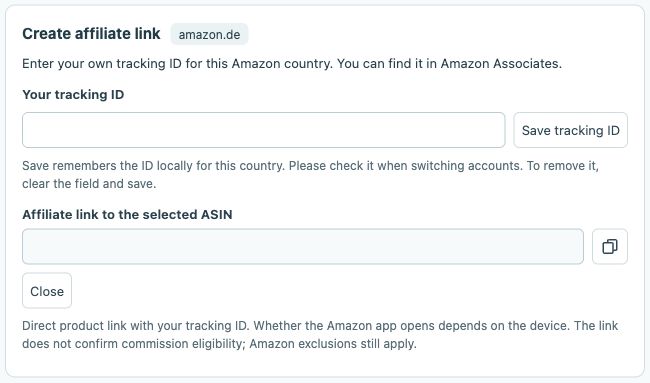
- Open Affiliate link on the product you want.
- Enter and check your own tracking ID for this Amazon marketplace.
- Copy the link and check the product and marketplace before sharing.
 12
- Enter your own tracking ID for this marketplace.
- Your affiliate link for the selected ASIN appears here.
Which tracking ID do I need?
Use your own Amazon tracking ID for the marketplace where the link will be used. A StoreKumpel partner identifier or discount code is not an Amazon tracking ID. If unsure, check the spelling in your Amazon affiliate account.
 12
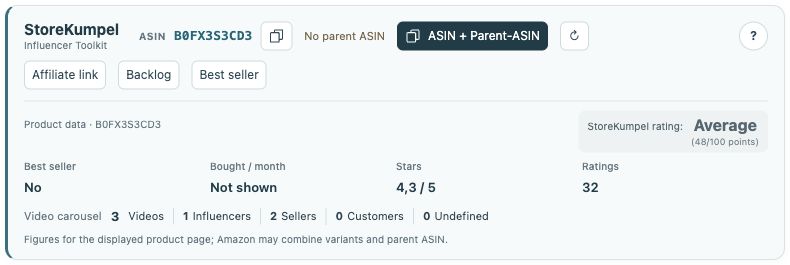
- Identifiers, copy buttons and additional tools.
- Product information and score at a glance.
What should I check before sharing?
Open the copied link and check the marketplace, product and variation. Also check that your tracking ID is included. Creating a link does not promise commission. Your participation and the relevant Amazon affiliate program rules still apply.
 12
- Copy the post link.
- Open the post in the editor.
Is this my StoreKumpel referral link?
No. This feature creates links to Amazon products. A StoreKumpel referral link promotes StoreKumpel itself. Use the correct type of link for your purpose and do not confuse it with the link to your own video post.