
Understand ASINs and parent ASINs
How to use it
- An ASIN identifies an Amazon product. Different colours or sizes can have different ASINs.
- A parent ASIN connects variations. Look for the label and, often, purple text.
- Copy individual identifiers or use ASIN + Parent-ASIN. In the editor, ASINs, Parent-ASINs and All help you copy existing tags.
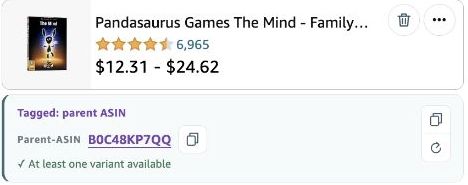
An example of a variation and a parent
A T-shirt in size M may have a different ASIN from the same model in size L. Both may share a parent ASIN. Choose the specific version that matches your post. The shared parent describes their relationship, not an extra size or a second item.
 123
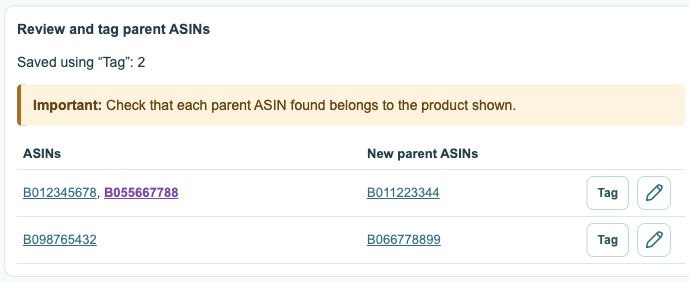
- Existing tags; recognized parents are purple.
- Review new parent suggestions first.
- Tag confirms and saves; the pencil opens the editor.
Where can I see the products that are actually tagged?
The storefront and country check should reflect the post’s actual tags. The editor and Details table can also show a related parent ASIN. Look for the Tagged label and distinguish a parent displayed alongside a product from a parent that is itself a tag.
 123
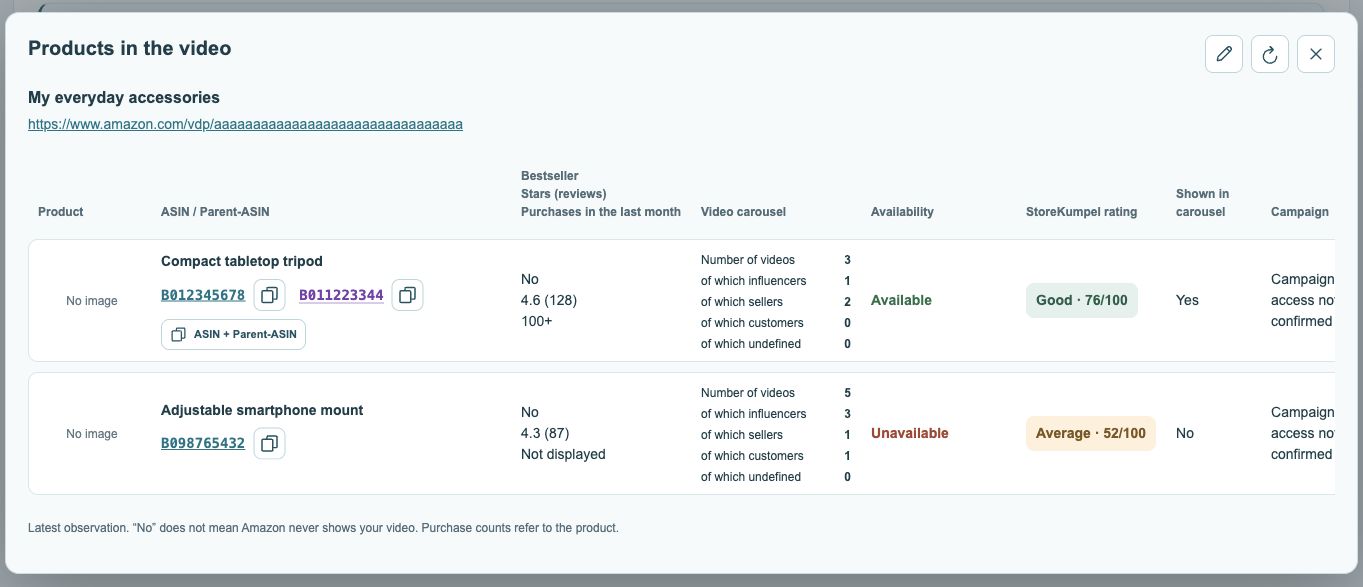
- Post title and link.
- Open or copy ASINs; parents are purple.
- Displayed videos by source.
What do the copy buttons copy?
An individual copy icon copies the adjacent identifier. ASIN + Parent-ASIN copies both when a parent is known. Always review the full selection before pasting into a tag field. Copying does not change a post or confirm that an identifier is already tagged.